

Best apps for logging car modifications and builds in 2026

Moterno fits owners keeping the car’s service history, documents, photos, and stories together. Best for planning a build: Notion; best for comparing parts: Google Sheets; best for organizing original receipts and documents: Google Drive—this 2026 guide explains which approach fits the way you work on your car.
Why this matters
Remember which suspension parts you fitted, or just which ones you wanted? A build log should answer that question without sending you through old messages and camera-roll screenshots.
Service records and modification records belong together. When you investigate a new noise, revisit an alignment, or explain the car to a buyer, you need to know what changed and what happened around it. A photograph shows the result; the receipt and installation note explain it.
The best choice in 2026 is the one you will update after a job. A detailed template that stays empty tells you less than a short, consistent history.
What makes the best car modification logging app?
Judge an app by how easily it helps you answer practical questions about your own car:
- Vehicle context: Can you keep the record attached to the right car rather than buried among unrelated notes?
- Supporting evidence: Can you store documents and photos, or clearly reference the original files?
- Change tracking: Can you distinguish an idea, a purchased part, and an installed modification?
- Useful detail: Can you record the date, mileage, part identification, and reason for the work?
- Easy retrieval: Can you find a receipt or installation note when you need it?
- Record continuity: Can you preserve the history beyond the current project, including subsequent service and changes?
Choose around the record you need, not the longest feature list. A planning board, a spreadsheet, a file archive, and a digital garage solve different problems. None replaces the habit of documenting work accurately.
Car modification logging apps at a glance
| Option | Best for | Standout feature | Key limitation |
|---|---|---|---|
| Moterno | A vehicle-centered history | Service history, documents, photos, and stories in a digital garage | Your entries still need supporting evidence and clear installation details |
| Notion | Planning a multi-stage build | Custom pages and databases for organizing tasks and notes | You design and maintain the structure yourself |
| Google Sheets | Comparing and tracking parts | Rows, columns, filters, and formulas | Photos and original documents need a separate filing approach |
| Google Drive | Keeping original documents organized | File storage organized into folders | Files alone do not create a readable build narrative |
This is a use-case comparison, not a measured test. Moterno publishes this blog and is listed first for that reason. Start with your main problem: remembering what happened, deciding what happens next, comparing parts, or finding the paperwork.
1. Moterno: where it fits
Moterno is a digital garage platform for recording service history, documents, photos, and stories about your vehicles. That vehicle-centered approach fits an owner who wants modifications to sit alongside the rest of the car’s life, rather than in a detached project notebook. It also has clubs and meets, model registries and a marketplace, and it is free to use.
For a build, write the story of each completed change and preserve its supporting material. A suspension installation means more when the record includes the parts receipt, installation photos, and the related alignment document—not just a picture of the finished car.
Pros:
- Keeps several types of vehicle records within a digital garage.
- Accommodates both practical paperwork and the personal story behind a build.
- Includes browsing and listing cars in a community marketplace.
Cons:
- A story without dates, mileage, or part details leaves important questions unanswered.
- Stored photos and documents do not independently verify installation quality or mechanical condition.
Best for: Owners who want a lasting car modification history alongside service records and ownership documents.
For your 2026 build, start with the car as it stands today. Document existing modifications before adding the next upgrade; otherwise, the history begins halfway through the story.
Verdict: Buy into the vehicle-history approach if remembering and documenting the car is your main goal.
2. Notion: for project planning
Notion combines pages with databases that you can organize into different views, including tables and boards. You can use that structure to separate planned work from completed work and keep project notes beside the relevant tasks.
It suits a build with several connected jobs. Create entries for the work itself, then record dependencies: a part awaiting installation, a measurement needed before ordering, or a workshop appointment that follows assembly. Keep the completed record separate from your wish list.
Notion pros:
- Custom databases let you organize the information around your build.
- Board and table views support different ways of reviewing the same project.
- Pages provide space for installation notes, photos, and explanations.
Notion cons:
- You must choose the fields and keep the template consistent.
- A crowded project workspace can mix speculative upgrades with actual vehicle history.
Best for: Owners coordinating a multi-stage project who enjoy maintaining their own system.
Use plain status labels such as Planned, Purchased, Installed, and Removed. When work is complete, add the installation date and evidence; moving a task across a board is not enough to explain what changed.
Verdict: Buy into Notion’s planning approach when organizing the next job matters as much as recording the last one.
3. Google Sheets: for parts comparisons
Google Sheets organizes information in rows and columns, with filters and formulas for reviewing structured data. That makes it useful when you want to compare part candidates or keep a consistent register of what you have purchased and installed.
Use a separate row for each part or job. Record the manufacturer, part number, status, installation date, mileage, and location of the supporting document. A spreadsheet works best when each column answers a clear question.
Google Sheets pros:
- Consistent columns make missing details easy to spot.
- Filters help separate installed parts from candidates or removed components.
- Formulas support calculations using the figures you enter.
Google Sheets cons:
- Long installation stories become awkward inside a grid.
- Original receipts and larger photo collections need an organized location outside the parts table.
Best for: Owners comparing alternatives or maintaining a detailed parts register.
Keep comparison rows distinct from installation rows. The brake kit you researched is not necessarily the brake kit on the car, and an old row should not silently become proof of fitment.
For a 2026 spreadsheet, define the columns before importing a pile of notes. Clean categories make the record easier to maintain than increasingly elaborate formulas.
Verdict: Buy into Google Sheets for structured parts tracking; skip it as your only home for the full build story.
4. Google Drive: for original documents
Google Drive stores files and lets you organize them into folders. It fits an owner whose immediate problem is scattered receipts, workshop documents, photos, and other files that need an orderly home.
Give each vehicle its own folder, then group files by purpose or job. Use descriptive filenames so an alignment report does not disappear among unnamed scans. The archive should support your log, not force you to open every file to reconstruct what happened.
Google Drive pros:
- Stores different document and image file types.
- Folders provide a straightforward way to separate vehicles and jobs.
- Original files remain useful alongside a spreadsheet, notebook, or vehicle record.
Google Drive cons:
- A collection of files does not explain the sequence or purpose of modifications.
- Folder organization and filenames require regular attention.
Best for: Owners who need to gather and organize the evidence behind their build.
Write a short summary for each completed job elsewhere in your chosen log, then identify the supporting files. A receipt proves a purchase; your installation record explains whether that part actually went onto the car.
Verdict: Buy into Google Drive as a document archive; skip folders alone as a complete modification log.
How to record a modification without creating extra work
Use the same short routine whenever you finish a job. Consistency matters more than writing a workshop manual after every change.
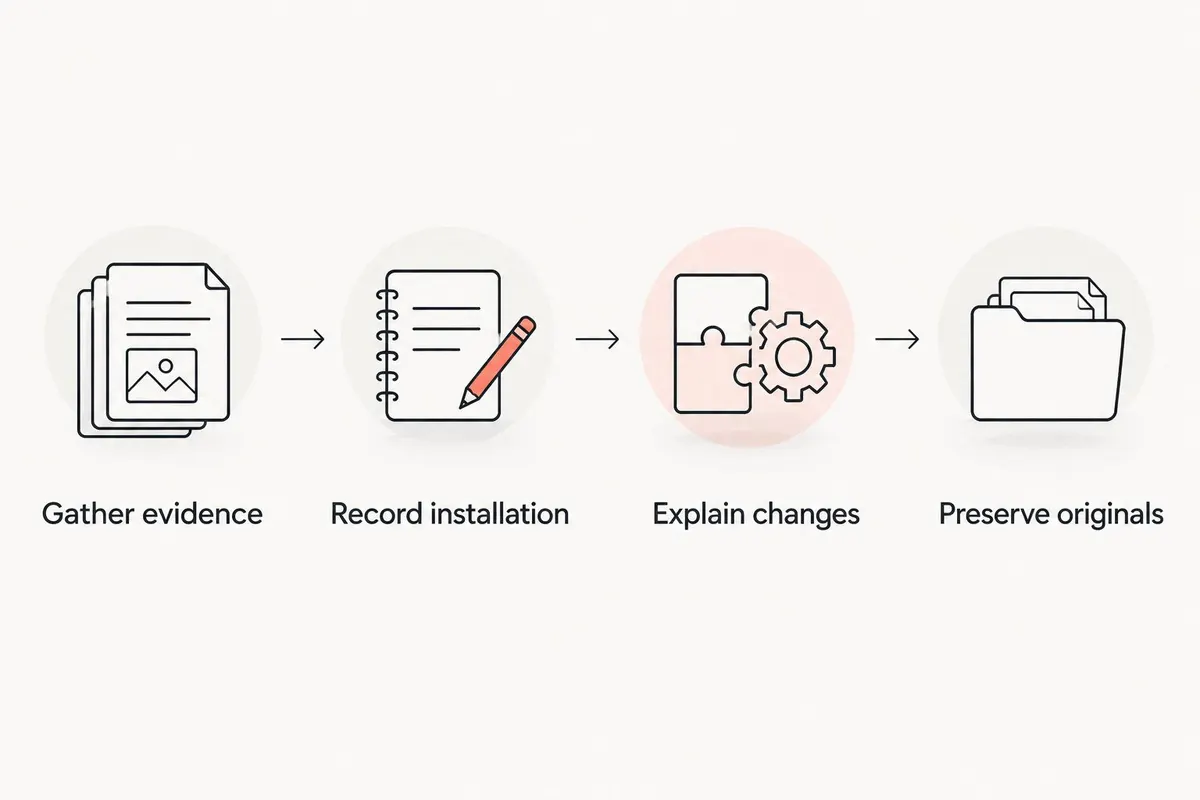
Gather evidence
Keep the receipt, part identification, and any workshop paperwork. Take 3 photos per job as a practical starting point: before the work, the component during installation, and the finished result. Add more when a hidden connection or mounting detail needs explaining.
Record installation
Create 1 entry per completed job. Include the date, odometer reading with its unit, component identification, and who performed the work. Record only what you know; an uncertain installation date should stay uncertain rather than become a guessed fact.
Explain changes
Describe why you made the change and what it replaced. If the old component came off the car, mark it as removed. Keep your observations separate from measurements, workshop findings, or claims from the part supplier.
Preserve originals
Keep original documents rather than relying only on cropped screenshots. Maintain 2 copies of essential documents in separate locations so your record does not depend on a single misplaced folder or device. This is a filing recommendation, not a claim about any app’s backup service.
A short entry written while the job is fresh is easier to check than a reconstruction months later. Before closing the record, make sure it describes the installed component—not merely the part you intended to fit.
Details that make a build log useful later
Your future self should understand an entry without remembering the conversation behind it. Write enough context to answer these questions:
- What changed? Identify the component and the work performed.
- What was removed? Record the previous part or setup when you know it.
- When did it happen? Use the actual date and odometer reading.
- Why did you do it? Distinguish repair, replacement, appearance, and other goals.
- What supports the entry? Identify receipts, photographs, and workshop documents.
- What remains unfinished? State pending work separately from completed work.
If you change the setup again during 2026, add a new entry instead of rewriting the earlier one. Preserving the sequence helps you understand which configuration was on the car at a particular point.
Avoid turning expectations into results. A component described as a performance upgrade does not establish a measured improvement on your car. Keep supplier descriptions, personal impressions, and documented measurements clearly separate.
How these options compare
The order follows the criteria above. The default recommendation favors a vehicle-centered history; the alternatives each earn a distinct place for planning, structured data, or original-file storage.
These are different approaches to record-keeping, not a ranking of measured app performance. No speed tests, user scores, or workshop trials underpin the order. Choose according to the job you need the app to do.
Which car modification logging app should you choose?
Moterno fits owners who want service history, documents, photos, and stories kept around the vehicle. Choose Notion when your main challenge is coordinating unfinished work, Google Sheets when you need a structured parts register, or Google Drive when the paperwork needs organizing first.
You do not need to maintain a full build log in every tool. Pick one main record, then use another only for a distinct supporting job. Copying the same installation details into several places creates more work and more opportunities for conflicting entries.
For a new 2026 record, start with the last completed modification. Add its paperwork and explain what changed. Then work backward through older jobs as you find reliable evidence.
FAQ
What’s the best app to log car modifications?
Moterno fits owners who want a vehicle-centered record combining service history, documents, photos, and stories. Notion suits project planning, while Google Sheets suits structured parts tracking.
Is Notion better than a spreadsheet for a car build?
Notion is better for combining project notes with task planning; Google Sheets is better for a consistent parts table. Choose according to whether your main problem is organizing work or comparing structured details.
What should I record when I install a car modification?
Record the installation date, odometer reading and unit, component identification, work performed, and supporting documents. Add why you made the change and identify the component it replaced.
Can I use Google Drive as my entire build log?
Google Drive can store your build files, but folders alone do not explain the sequence of changes. Pair the archive with written entries that distinguish purchased, installed, and removed parts.
Should planned upgrades go in my modification history?
Keep planned upgrades separate from completed modifications. A wish list or purchased part is not evidence that the component was installed on the car.
Does a modification log prove my car is mechanically sound?
No, a modification log does not independently establish mechanical condition or installation quality. It preserves information and evidence that you or a qualified professional can review.
How do I log modifications made by a previous owner?
Record the modifications you can identify and preserve any supporting paperwork. Label uncertain dates, part details, and installation information rather than filling gaps with guesses.
One last thing
A receipt records a purchase, not an installation. Keep that distinction visible in your build log. A part can remain in its box, be returned, or come off the car later; your record should describe the car’s actual configuration, not everything you have bought for it.