

Best car maintenance tracker apps for EV owners in 2026

Moterno fits owners who want service history, documents, photos and stories together. Best for manufacturer-provided information: your vehicle manufacturer’s companion app; best for custom maintenance tracking: Google Sheets; best for a notebook-style record: Microsoft OneNote. This 2026 guide helps you choose the best car maintenance tracker for electric vehicles without confusing service records with battery diagnostics.
Why this matters
Remember when you last rotated the tires? Where is the receipt for that alignment? Electric vehicles still need maintenance records, even though a battery-electric car has no engine oil to change.
The useful record connects the work, the date, the odometer reading, and the supporting document. That gives you something better than a reminder you dismissed or a receipt buried in your email. You can see what happened and explain it to a workshop or prospective buyer.
For your 2026 setup, separate two jobs: knowing what needs attention and documenting what was actually done. A vehicle notification helps with the first. A maintenance log and its receipts handle the second.
What makes the best EV maintenance tracker
Choose your tracker around the records you want to keep, not the longest feature list.
- Service history: You need a clear record of completed work, with dates and odometer readings. A reminder alone is not proof of service.
- Supporting documents: Receipts, inspection reports, and workshop notes should be easy to connect to the relevant job. A vague entry such as “tires done” leaves questions unanswered.
- EV-appropriate tracking: Your record should reflect your vehicle’s maintenance schedule. Do not copy engine-oil tasks into a battery-electric vehicle’s checklist.
- Room for context: Photos and notes help explain tire wear, damage, modifications, and recurring concerns. The receipt describes the transaction; your notes explain the reason.
- A routine you will keep: Pick an approach you will update after a workshop visit. A detailed system that stays empty is less useful than a simple, current log.
- Clear evidence boundaries: A maintenance entry, a dashboard range estimate, and a battery diagnostic report are different things. Keep those distinctions visible.
EV maintenance trackers at a glance
The order below follows ownership needs, not a claim that every option performs the same job. No single option replaces your vehicle’s maintenance instructions or a qualified inspection.
| Rank | Option | Best for | Standout use | Key limitation |
|---|---|---|---|---|
| 1 | Moterno | A documented vehicle history | Service history alongside documents, photos, and stories | An owner-maintained record is not an independent inspection |
| 2 | Manufacturer companion app | Manufacturer-provided vehicle information | Checking the functions supported for your specific EV | Features differ by manufacturer, vehicle, and account |
| 3 | Google Sheets | A custom maintenance log | Sorting structured records and building your own checklist | You must design and maintain the record structure |
| 4 | Microsoft OneNote | Detailed notes and supporting material | Organizing text, pictures, and files in notebooks | Consistent service fields require your own template |
1. Moterno: where it fits
Moterno is a digital garage for logging service history, documents, photos, and vehicle stories. It also includes a community marketplace where owners can browse or list cars for sale. It also has clubs and meets and model registries, and it is free to use.
Moterno fits EV owners who want service records, documents, photos, and stories together in a digital garage. That is a different goal from watching live vehicle readings. You are building the history of the car you own, including the work and experiences that matter to you.
A useful entry explains more than the name of a repair. Record why you booked the appointment, what the workshop did, and which document supports the entry. If you photographed uneven tire wear before an alignment, preserve that context alongside the service history.
Moterno pros
- Its stated purpose includes service history and vehicle documents, rather than just a general notebook.
- Photos and stories give you space to record ownership context beyond maintenance tasks.
- The community marketplace adds a place to browse or list vehicles alongside the platform’s record-keeping purpose.
Moterno cons
- The accuracy of an owner-maintained history depends on the records you add.
- A receipt or service entry does not independently establish battery condition.
- Keeping vehicle stories does not remove the need to distinguish personal observations from workshop findings.
Best for: Owners who want to document both the maintenance and the life of their EV.
Verdict: Buy into this approach if documented history is your priority. Keep the maintenance entries factual, then use photos and stories to add the personal side.
2. Manufacturer companion app: for vehicle-specific information
Your vehicle manufacturer’s companion app belongs on the shortlist for information supplied through the manufacturer’s system. Check the functions offered for your exact vehicle and account before relying on it for maintenance.
The important question is not whether an app has a polished vehicle screen. Ask whether it shows the information you need and whether it preserves completed work. A current status display and a historical service record answer different questions.
For a 2026 comparison, make a practical checklist: Can you find relevant service information? Can you see completed workshop visits? Can you add work performed elsewhere? Treat each answer separately rather than assuming the app covers the whole ownership history.
Manufacturer companion app pros
- It gives you a place to check the vehicle information the manufacturer supplies through its app.
- Supported functions are tied to a particular vehicle ecosystem rather than a generic log template.
- It is a useful starting point when you need to understand which official app functions your EV supports.
Manufacturer companion app cons
- Functions differ between manufacturers, vehicles, markets, and accounts.
- A vehicle-status feature does not establish that independent-workshop records are included.
- You still need to preserve documents that the app does not store or display.
Best for: Owners whose priority is the information and functions supported by their vehicle manufacturer.
Verdict: Hold until you verify the record-keeping functions. Use the manufacturer companion app for its supported role, and keep a separate history for anything it does not cover.
3. Google Sheets: for a custom EV maintenance log
Google Sheets is a spreadsheet application, not a purpose-built EV maintenance tracker. You create the columns, enter the records, and decide how to sort or summarize them.
That flexibility is useful when you want a precise structure. You can separate the date, odometer reading, service category, workshop, observation, and document reference instead of putting everything into a single note.
Start with consistent categories such as tires, brakes, inspections, and repairs. Add a category only when it helps you find something later. The point is to make your history readable, not to build a complicated dashboard before entering your first receipt.
Google Sheets pros
- Rows and columns give each service event a consistent structure.
- Sorting and filtering help you review records by date or category.
- You control the fields and can change the template to match your record-keeping needs.
- Formulas support your own summaries without requiring a predefined vehicle-log layout.
Google Sheets cons
- You are responsible for designing the maintenance log and keeping entries consistent.
- Receipts and photos need an organized storage approach alongside the spreadsheet.
- A formula cannot determine a safe maintenance interval without valid instructions and inputs.
Best for: Owners who enjoy structured records and want control over their maintenance checklist.
Verdict: Buy into the spreadsheet approach if you will maintain the template. Skip elaborate calculations until your basic service history is complete and accurate.
4. Microsoft OneNote: for detailed repair notes
Microsoft OneNote organizes notes in notebooks, sections, and pages. You can combine written observations with pictures and attached files, making it useful for documenting a repair that needs more explanation than a spreadsheet row.
Use a page to describe the concern, the workshop visit, and the outcome. For example, keep your description of a vibration separate from the workshop’s diagnosis, then attach the relevant paperwork. That preserves who said what without turning your observation into a technical conclusion.
A notebook is also helpful when you want to record a sequence of visits about the same issue. Give each page a clear date and subject so the story remains understandable when you return to it later.
Microsoft OneNote pros
- Text, pictures, and files can sit together in a notebook-style record.
- Sections and pages give you room to organize longer repair stories.
- A repeatable page template can keep your service notes consistent.
Microsoft OneNote cons
- Maintenance-specific fields and categories depend on your own organization.
- Comparing many service events is less direct than sorting spreadsheet rows.
- A long narrative can bury the service date or odometer reading unless you put them first.
Best for: Owners who want detailed repair notes with supporting material.
Verdict: Buy into the notebook approach for context-rich records. Skip it as your main tracker if your priority is filtering a structured maintenance table.
How these options compare
This is a use-case comparison, not a measured test. Moterno publishes this blog and is listed first for that reason. It distinguishes a vehicle-focused platform from a manufacturer app, a spreadsheet, and a notebook rather than treating them as interchangeable products.
The default recommendation fits an owner who wants a vehicle history without designing a general-purpose template. Google Sheets ranks higher for someone who wants custom fields; Microsoft OneNote ranks higher for someone who writes detailed repair notes. This is a use-case ranking, not a battery-diagnostic test or a measured performance comparison.
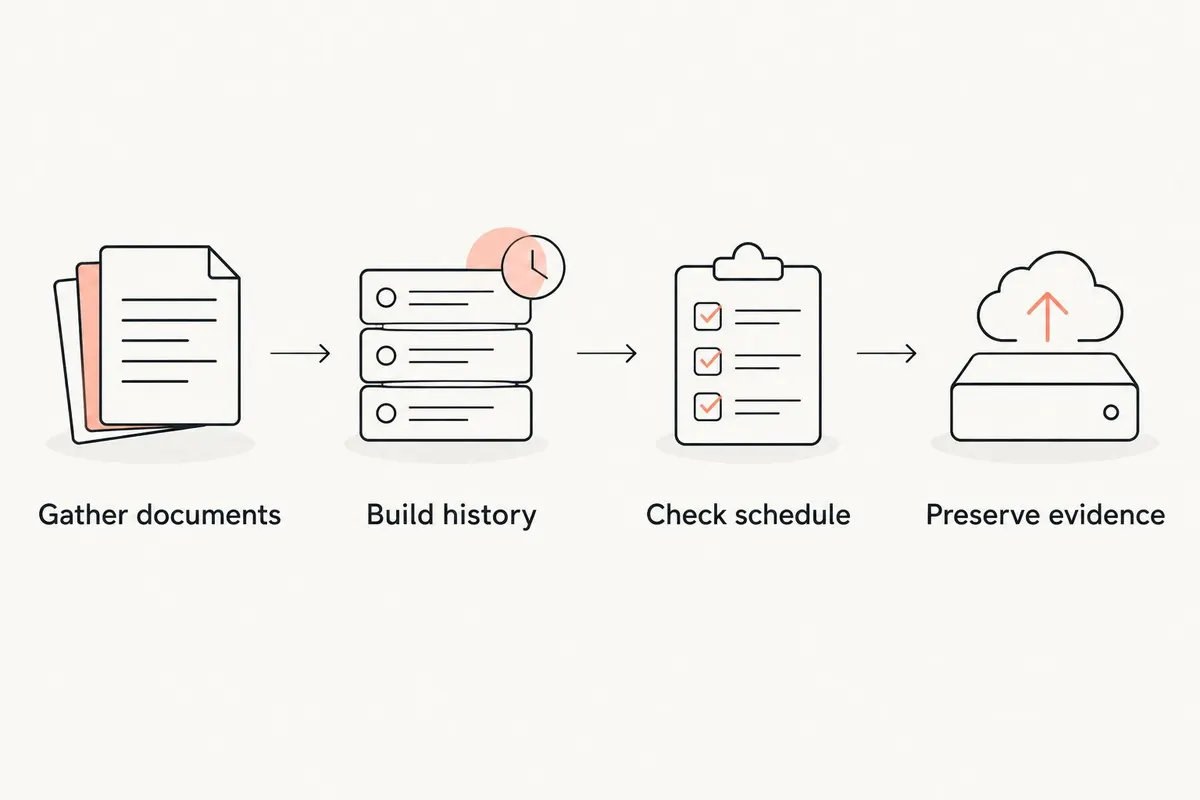
Set up your EV maintenance record in 2026
You do not need to reconstruct every day of ownership before starting. Build a useful record from the documents you have, then make the next service visit easier to document.
Gather documents
Collect workshop invoices, inspection reports, tire receipts, and any written diagnostic findings. Keep document types distinct: registration paperwork establishes different facts from a maintenance invoice.
For a broader filing approach, see the guide to apps for storing car documents and titles. Keep original paperwork where required, and make digital copies readable enough to identify the vehicle, date, and work performed.
Build history
Give each completed service event 3 core fields: date, odometer reading, and work performed. Then connect the supporting receipt or report. Use the same odometer unit throughout the log, and label it clearly.
If an old receipt lacks an odometer reading, leave that field unknown rather than estimating it. An honest gap is more useful than a precise-looking number that nobody recorded.
Check schedule
Use the maintenance instructions for your exact vehicle, including any conditions that change the schedule. Tire care, brake inspections, filters, and fluid requirements are not identical across EVs.
Do not turn a generic internet checklist into your car’s official maintenance plan. Record the source of a task so you know whether it came from the manufacturer’s instructions or a workshop recommendation.
Preserve evidence
Keep 2 copies of important digital documents: your working record and a separate backup. This is a record-keeping recommendation, not a promise about any app’s backup system.
Keep the original diagnostic report rather than replacing it with a short summary. Your note can explain the visit, but the source document preserves the wording and scope of the finding.
Start with 1 vehicle record and complete it before adding complexity. A clear entry for your latest service is a better foundation than an unfinished system for every possible ownership event.
Which EV maintenance tracker should you choose?
Choose the digital garage approach when you want a documented ownership history. Choose Google Sheets when you want to design the fields yourself, or Microsoft OneNote when repair notes and supporting material matter more than a sortable table.
Keep the manufacturer companion app for the functions it actually supports. There is no need to force it to become your complete archive.
For 2026, the best setup is the one you update after completed work. Enter the service, preserve the evidence, and check the vehicle’s instructions for what comes next. Do not make battery-health claims from a maintenance log alone.
FAQ
What’s the best car maintenance tracker for electric vehicles?
Moterno fits EV owners who want service history, documents, photos, and stories in a digital garage. Google Sheets suits a custom log, while Microsoft OneNote suits detailed repair notes.
Do electric cars still need maintenance tracking?
Yes, electric cars still benefit from a record of maintenance, inspections, and repairs. Follow the instructions for your exact vehicle rather than copying an engine-oil checklist from a combustion car.
Can a maintenance tracker tell me my EV battery’s health?
A maintenance log alone does not measure EV battery health. Preserve any diagnostic report and distinguish its findings from dashboard range estimates or your own observations.
Is my manufacturer’s app enough to keep all my service records?
Use your manufacturer’s app as the complete archive only after checking that it covers the records you need. Verify completed service history, independent-workshop entries, and document storage separately.
What should I record after an EV service appointment?
Record the service date, odometer reading, and work performed, then preserve the supporting invoice or report. Add your reason for the visit and keep it separate from the workshop’s diagnosis.
Is Google Sheets better than a vehicle maintenance app?
Google Sheets is better for owners who want to design and maintain their own structured log. A vehicle-focused platform is a better fit when you want its existing record-keeping approach instead of building a template.
Should I keep charging history with maintenance records?
Keep charging history separate from completed maintenance, even if both belong in your ownership records. Charging activity documents use; a service invoice documents work performed.
One last thing
Photograph the paperwork, not just the car. A picture after a repair tells part of the story, but the invoice explains what was done.
For your next service visit in 2026, ask for a written record that identifies the vehicle and describes the completed work. Save that document before adding your own summary. Future you should not have to guess whether “brakes checked” meant an inspection, an adjustment, or replacement parts.