

How to share your history with a buyer
A sale folder is a secret link you paste into your ad or a message. The buyer sees the documented history and can download it as a PDF. When the sale is done, an ownership transfer hands the history over.
Create the sale folder
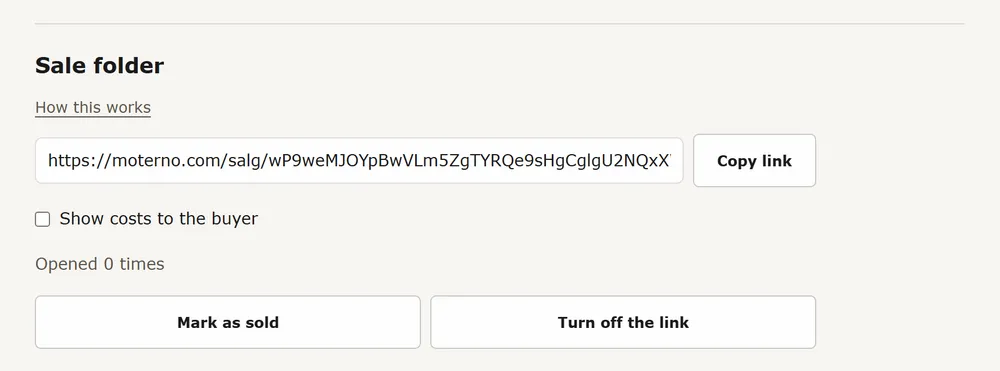
Open your vehicle, go to the Documents tab and find Sale folder. Press Create sale folder.
Decide about costs
Costs are hidden from the buyer by default. Switch on Show costs to the buyer if you want them shown, in the list and in the PDF.
Copy the link
Copy the link and paste it into your ad or a message. Anyone with the link can open it, so share it only where you want to. It is not listed anywhere and search engines are told to leave it alone. You can see how many times it has been opened.
What the buyer sees
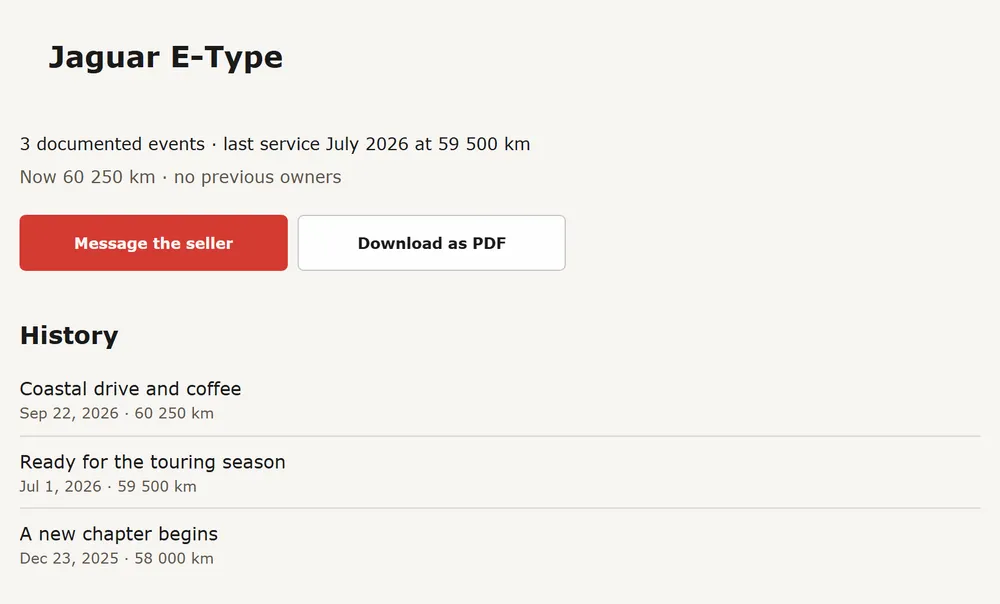
The buyer sees your photos (not the private ones), a history list (title, date, mileage and workshop), a Receipt tag where a document is attached, installed parts, distance per year and the Norwegian registry facts, with buttons to Message the seller and Download as PDF. The buyer does not get the document files, event descriptions or notes, reminders, your name, or the VIN and registration number in the PDF. Costs show only if you switched them on. Heads-up: entries you marked Private are still listed by title, date and mileage, but never their descriptions.
Turn it off when you are done
Turn off the link stops it working straight away. Create new link replaces it, and the old one dies. Mark as sold turns the link off and takes you to the transfer.
Hand over the history
To give the vehicle to the buyer, open the Timeline tab, choose the Ownership filter and find Transfer ownership. Enter the buyer's e-mail and press Send transfer. Public and follower-visible history goes with the vehicle. Your private entries stay yours by default (kept for you only, or deleted if you choose), and you can pick private records to include. The buyer gets a link by e-mail that works for 7 days, sees what is included, accepts, and the vehicle is theirs with its history.
- Creating a sale folder and downloading the buyer PDF are free.