

How to find your car in a registry, or start one
A registry collects every known car of one model, by chassis number, with status, details and owners. You can claim your own car in one, or start a registry for a model you care about. Registries are free.
Find the registry and your car
Open Registries, search by name, make or model, and open the registry. Then look for your car in its list.
Press This is my car
On your car's tile or page, press This is my car. If you are not logged in you are asked to log in or sign up first. Car not listed? Use Not listed? Submit it.

Send the claim
Write a short message to the registrars and attach at least one file as evidence, such as the registration document, a photo of the chassis plate or an invoice (images or PDF). Only the registry's registrars can see your files. A registrar reviews the claim and you get a notification. Some registrars invite owners by e-mail instead (they keep the owner's e-mail privately, only for the invitation): then press Confirm I own it in the e-mail's link, valid for 14 days. You can then add the car to your garage.
Manage your car
Once you are the owner, Manage my car in the registry lets you propose changes to the details (a registrar approves them), upload photos and documents, link the car to a vehicle in your garage, and choose whether your name is shown as owner.
Start a registry
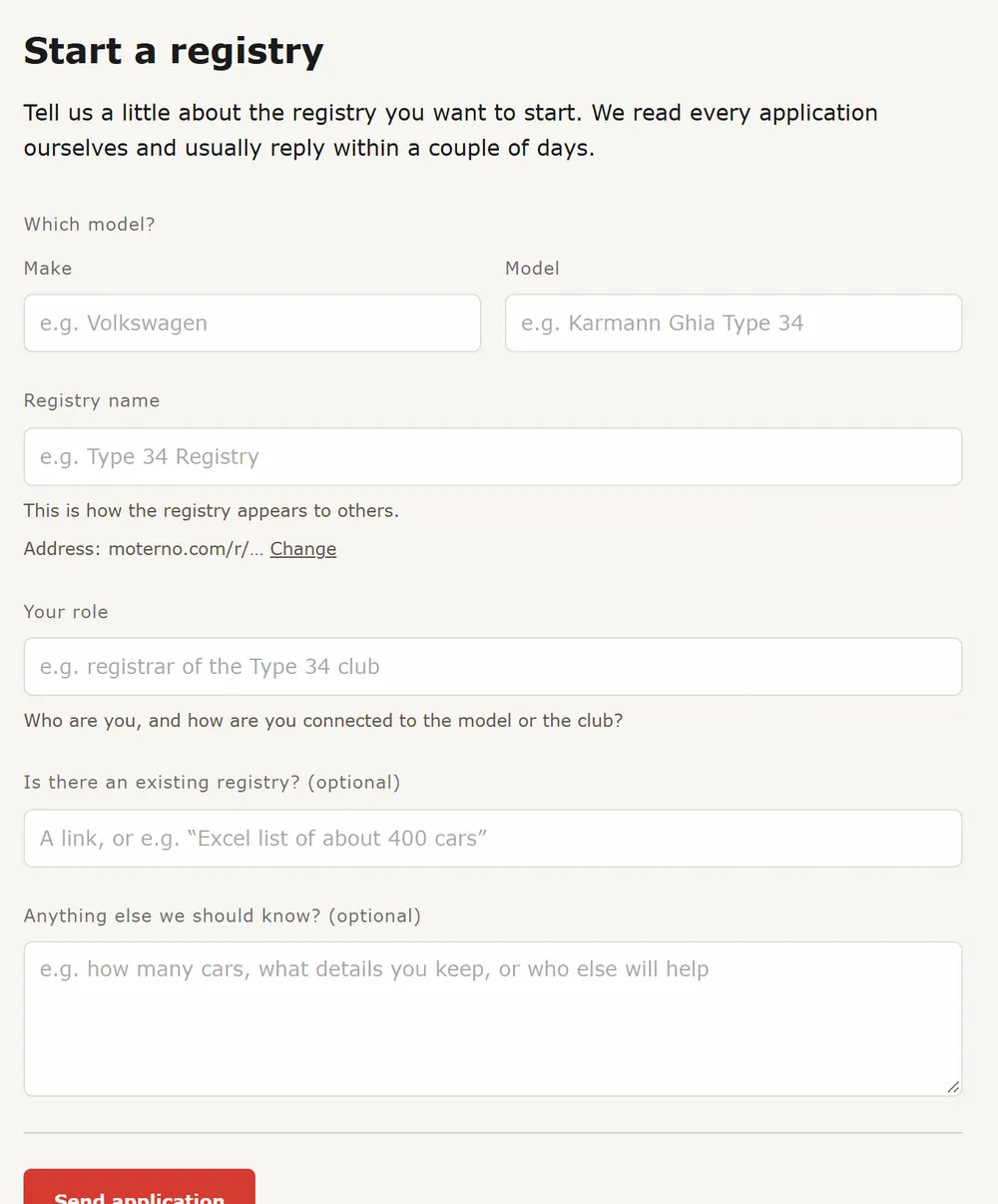
On Registries, press Start a registry (you need to be logged in). Fill in the make, the model, a name for the registry, its address and your role, then press Send application. Moterno reads each application by hand and usually replies within a couple of days, by e-mail and in Moterno. Once approved, you are the registrar and can add cars one by one or import a list. In Settings you can name the identifier to suit your cars (for example “Fabrik-Nr.” instead of “Chassis number”) and upload a logo for the registry. To import a list, use Import in the registry: any column can be the identifier (VIN, chassis, factory number or serial). Rows without one get an automatic number (UNK-0001 …) that you can replace later by editing the car. A column of photo links (https) in the CSV is downloaded for you. To invite many owners at once, add an owner e-mail per car and use Invite owners.
What is public
A new registry starts as listed (only its name, logo and number of cars are shown, with a Request access button) until its owner makes it visible. Each car has one Shown publicly switch: on means anyone can see it, off means only the registry's people can. Chassis numbers are private by default, and only the registry owner can make them public, with the Chassis number row in the registry's fields. Documents are always for the registry only. A registry can share a car with another registry: the sending registry allows it, the receiving one decides whether the car is shown publicly there. Statistics and a country map are always visible on the registry page, and the map links filter the list by country.
- Registries are yours: you own the content and can export everything.
- Photos cannot be inside a CSV. Add them with the ZIP import: one folder per car, named like “21.928341 LA 12345 Ola Nordmann” (chassis, registration number, name), with photos (JPG, PNG, WebP) and PDFs inside; you can correct each car's number before importing. A CSV column of photo links (https) can also be downloaded.
- Would you rather we import your file for you? Send it to post@moterno.com. It is free.